
Appearance
Random Node
TL;DR:
- What: Split your audience into groups or vary bot responses based on chance.
- When: Running A/B tests or distributing leads between team members.
- Result: The bot selects one branch based on configured weights and immediately follows that path.
What it does
The Random node routes users down different paths based on chance. Unlike the Condition node, which checks user data, this node "rolls a dice" to decide where the user goes next.
It supports weighted probabilities, meaning you can control what percentage of users should take each path. For example, you can send 80% of users to a standard message and 20% to a special offer to test which one performs better.
Weights define probability, not a guaranteed exact split for small groups. For example, a 50/50 split may not look perfectly even after 10 users. It becomes more balanced as more users pass through the node.
When to use it
- ✅ A/B testing — Compare two different messages, buttons, or entire flows to see which converts better.
- ✅ Lead distribution — Evenly or unevenly distribute incoming leads among different sales agents.
- ✅ Content variety — Give your bot more personality by having it choose from a set of different greetings or responses.
- ✅ Load balancing — Distribute users across different external resources or support queues.
When NOT to use it
- ❌ Logic-based branching — If you need to send users down a path because they have a specific tag or variable, use the Condition node.
- ❌ Sequential distribution — If you need a strict round-robin (User 1 to A, User 2 to B, User 3 to A...), the Random node cannot guarantee this order as it is truly random for each entry.
In the editor
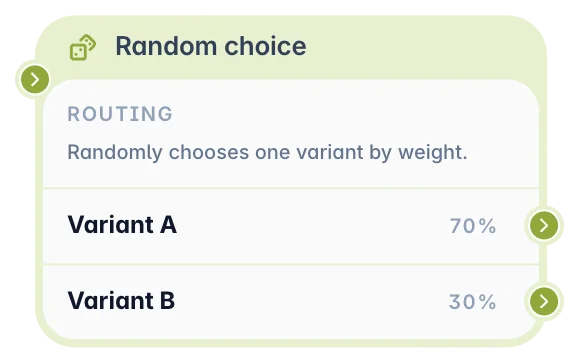
Add a Random node to the canvas, create branches in the settings panel, set a weight for each branch, and connect each branch output to the next node.
What you can configure
In a Random node, you create two or more branches and choose how likely each branch is to be selected.
You can configure:
- Weight — The percentage chance that users will take this branch.
- Branch destination — The next node connected to each branch output.
WARNING
The sum of all branch weights must equal exactly 100% before the scenario can be published.
Output and behavior
When a user reaches a Random node, the bot chooses one branch based on the configured weights.
- Next step behavior: The bot selects one branch and immediately follows its connected path.
- User-facing result: The user does not see the Random node itself. They only see the message or action from the selected path.
- Persistence: The choice is made each time the user reaches this node. If the user loops back to the same Random node, they may get a different branch.
- Validation: The scenario cannot be published until all branch weights add up to 100%.
Examples
Example 1: Split users between two welcome messages
Goal: Split users between two welcome messages.
Setup: Create two branches: "Variant A" with weight 50 and "Variant B" with weight 50. Connect each branch to a different Message node.
Result: Users are randomly split between the two welcome messages.
Example 2: Test offer performance
Goal: Test whether a standard offer or a special offer gets more clicks.
Setup: Create two branches: "Variant A" with weight 80 and "Variant B" with weight 20. Connect each branch to a different Message node and tag users in each branch with an Actions node.
Result: Most users see the standard offer, while a smaller group sees the special offer for comparison.
Common pitfalls
Weights do not add up to 100% → One or more branches are missing weight or the total is incorrect. Fix: Adjust the weights until the total is exactly 100%.
A selected branch goes nowhere → The branch output is not connected to another node. Fix: Connect every branch to a destination node.
The split does not look perfectly even → Random probability is not exact for small groups. Fix: Test with a larger number of users or use another logic pattern if you need strict rotation.
FAQ
Q: Can I control the exact probability of each branch?
A: Yes. Set the weight for each branch. All weights must add up to 100%.Q: Does Random guarantee an exact 50/50 split?
A: No. It uses probability. Small groups may look uneven, but the split becomes more balanced over time.Q: What happens if one branch is deleted?
A: Its output path is removed. Re-adjust the remaining branch weights so they add up to 100%.Q: Does the random choice persist per user?
A: No. The choice is made each time the user reaches the node.
Related nodes
- Condition Node — Use data-driven rules instead of random selection.
- Message Node — Send different content for each random branch.
- Actions Node — Tag users after each branch for later analysis or follow-up.