
Appearance
Formula Node
TL;DR:
- What: Prepare data, calculate prices, or format text strings before using them in other nodes.
- When: You need logic that is more complex than a simple "Set Variable" but does not require an external API call.
- Result: The bot evaluates your expressions and saves the results into variables. If an error occurs, execution stops at that line.
What it does
The Formula node is a background processing block that manipulates data within your scenario. It does not interact with the user or send messages. Instead, it evaluates mathematical or logical expressions line by line and stores the results in variables for later use in Message, Condition, or Actions nodes.
A Formula node does not send messages. To show the result to the user, use a Message node after it and insert the saved variable into the message.
When to use it
- ✅ Calculating totals — Summing up points, calculating discounts, or adding taxes to a price.
- ✅ Text personalization — Combining a user's name with custom text to create a unique greeting.
- ✅ Data normalization — Converting user input to lowercase, trimming spaces, or formatting dates.
- ✅ Logic preparation — Creating a flag variable based on multiple complex checks.
When NOT to use it
- ❌ Sending messages — This node is silent. If you want the user to see the result, you must pass it to a Message node afterwards.
- ❌ Branching flow — The Formula node always has a single output. To send users down different paths, use a Condition or Random node.
- ❌ External data — If you need to fetch or send data to external systems, use Actions integrations: Sync HTTP, Webhook, or Email.
In the editor
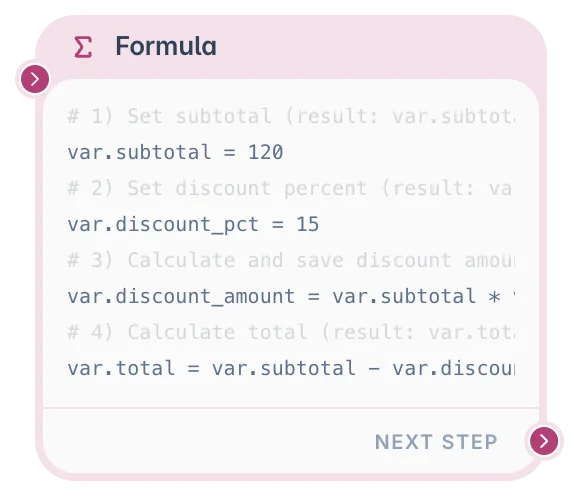
Formula uses a code editor in the node settings panel. You write expressions line by line and the bot evaluates them when the user reaches this node.
What you can configure
In a Formula node, you write simple expressions that calculate or transform values and save the result into variables.
You can configure:
- Formula code — One or more assignment lines, such as
var.total = var.price * var.quantity. - Target variables — Where the calculated result should be saved.
- Source values — Variables, system fields, UTM values, or global variables used in the calculation.
- Go to next step — Whether the scenario should continue after the formula runs. Turn this off when the formula should end the flow unless something else resumes it later.
- Continue on error — When enabled, the flow proceeds to the next node even if the formula fails. This is useful for best-effort calculations where you do not want a single bad expression to stop the entire scenario.
Values you can use
A Formula node can read values that already exist in the scenario, such as:
- Answers saved from Question cards.
- User profile fields (for example,
{%first_name%},{%email%},{%phone%}). - UTM source values (for example,
{%utm_source%}). - Workspace global variables (for example,
{@my_global@}). - Temporary local values used only inside the formula (for example,
{*local1*}).
It can save results into scenario variables (var.*), writable fields, UTM values, globals, or local temporary values. Local variables exist only during Formula execution and are not persisted after the node finishes.
System fields (first_name, email, phone, etc.) are read-only — you cannot assign to them. UTM parameters (utm_source, utm_campaign, etc.) and custom fields (F_*) are writable from Formula.
Formula vs Actions
Use Actions for simple direct updates:
- Add a tag.
- Set a variable to a fixed value.
- Increment a counter by a fixed number.
- Clear a field.
Use Formula when the value must be calculated or transformed first:
- Calculate a total price.
- Format a date.
- Normalize text.
- Combine several values into one.
- Create a flag based on several conditions.
Formula syntax
Each line should assign a result to a target:
text
target = expressionExamples:
text
var.total = var.price * var.quantity
var.name_upper = upper(var.name)
var.has_discount = if(var.coupon == "YES", true, false)
Allowed targets:
var.key— scenario session variable (reset on/start)var.key+— scenario persist variable (survives/start, stored in dedicated Redis key){*local1*}…{*local5*}— temporary local values{%utm_*%}— UTM parameters{@...@}— workspace globals
Not allowed:
- System fields (
{%first_name%}, etc.) - Plain identifiers (for example,
x = 1) - Function calls as targets
Session vs persist variables
Use var.score for temporary data within one conversation (quiz scores, intermediate totals). Use var.score+ when the value should survive a /start command and be remembered across multiple sessions (loyalty points, completed levels, user preferences).
Output and behavior
When a user reaches a Formula node, the bot runs the formula lines from top to bottom.
- Next step behavior: If the formula runs successfully, the bot follows the Next path when Go to next step is enabled.
- User-facing result: The user does not see anything from this node directly.
- Side effects: The node updates the variables or values targeted by your formula.
- Errors: If one line fails, the Formula node stops at that line and later lines are not processed.
TIP
Use isNull() before doing math with values that may be empty.
Common functions
| Function | Use it for |
|---|---|
round(x) | Round a number |
int(x) | Convert a value to an integer |
float(x) | Convert a value to a number with decimals |
str(x) | Convert a value to text |
concat(value, ...) | Join values into one text string |
len(text) | Count text length |
upper(text) | Convert text to uppercase |
lower(text) | Convert text to lowercase |
if(condition, yes, no) | Return one value if true and another if false |
isNull(x) | Check whether a value is empty |
addDays(date, n) | Add days to a date |
formatDate(date, format) | Format a date |
Full function reference
Type conversion
| Function | Returns | Description |
|---|---|---|
round(x[, n]) | number | Round x to n decimal places (default 0 = integer). x must be a number. round(3.14159, 2) → 3.14. |
int(x) | number | Convert string or number to integer (truncates). x: string | number. |
float(x) | number | Convert string or number to float. x: string | number. |
str(x) | string | Convert any value to its string representation. |
String
| Function | Returns | Description |
|---|---|---|
concat(value, ...) | string | Join values into one string. Missing variables, null, and empty values become "". Supports escaped newlines such as "\n" and nested functions or macros inside arguments. |
len(x) | number | Length of a string (or list). |
upper(text) | string | Convert text to uppercase. text must be a string. |
lower(text) | string | Convert text to lowercase. text must be a string. |
trim(text) | string | Remove leading and trailing whitespace from text. |
replace(text, search, replacement) | string | Replace all occurrences of search in text with replacement. All arguments must be strings. |
contains(text, search) | boolean | Returns True if text contains search (case-sensitive). |
substring(text, start, end) | string | Extract characters from text from index start (inclusive) to end (exclusive). Both are zero-based integers. substring("hello", 1, 3) → "el". |
split(text, sep[, n]) | string | Split text by sep, return element at index n (default 0). -1 returns the last element. If the index is out of range, returns "". |
match(text, pattern, ignore_case) | boolean | Returns True if text matches regex pattern. ignore_case is optional boolean (default False). text and pattern must be strings. |
Logic
| Function | Returns | Description |
|---|---|---|
if(cond, then, else) | any | Returns then value when cond is True, otherwise else. cond must be boolean. |
isNull(x) | boolean | Returns True if x is null or empty. |
Date and time
All date-arithmetic functions (addYear, addMonth, addDays, addMinutes) accept a date string in ISO-8601 format ("YYYY-MM-DDTHH:MM:SS.sssZ" or "YYYY-MM-DD") and return an ISO-8601 string.
| Function | Returns | Description |
|---|---|---|
getCurrentTime() | string | Current UTC date/time as ISO-8601 string. No arguments. Legacy function — prefer now(). |
now([tz]) | datetime | Current date/time as a typed datetime value. tz is an optional timezone string (for example, "Europe/London", "America/New_York", "Asia/Tokyo", "UTC", "EST"). Defaults to the workspace configured timezone. Use in date arithmetic. |
today([tz]) | date | Current date (no time part) as a typed date value in the given timezone. tz is optional. Useful when you need only the date portion. |
addYear(date, n) | string | Add n years to date. date: ISO string. n: integer (can be negative). |
addMonth(date, n) | string | Add n months to date. date: ISO string. n: integer. |
addDays(date, n) | string | Add n days to date. date: ISO string. n: integer. |
addMinutes(date, n) | string | Add n minutes to date. date: ISO string. n: integer. |
formatDate(date, fmt) | string | Format date using fmt pattern. date: ISO string. fmt: strftime-style format string, for example, "%Y-%m-%d", "%d.%m.%Y", "%H:%M". |
dateDiff(d1, d2, unit) | number | Absolute difference between d1 and d2. unit must be exactly "days" or "minutes". Both d1, d2 must be ISO strings. Always returns a positive number. |
Random
| Function | Returns | Description |
|---|---|---|
random(min, max) | number | Random integer between min and max (inclusive). Both must be numbers. Limits: min >= -9 999 999, max <= 9 999 999, min <= max. |
Identifiers
| Function | Returns | Description |
|---|---|---|
uuid() | string | Generate a UUID string. Useful for one-time refs, attribution keys, and other unique identifiers inside the scenario. No arguments. |
Operators and keywords
Arithmetic operators
| Operator | Meaning | Operands | Example |
|---|---|---|---|
+ | Add numbers or concatenate strings | number + number → number; any other → string | 2 + 3 → 5;"Hi, " + var.name → "Hi, John" |
- | Subtract | number, number | 10 - 3 → 7 |
* | Multiply | number, number | 4 * 2.5 → 10 |
/ | Divide | number, number | 9 / 4 → 2.25 |
% | Modulo (remainder) | number, number | 10 % 3 → 1;8 % 2 → 0 |
Division or modulo by zero throws a runtime error.
+ is the only mixed-type operator: number + number performs addition, everything else triggers string concatenation (each side is converted with str()).
Comparison operators
All comparison operators return a boolean (True or False).
| Operator | Meaning | Allowed operand types |
|---|---|---|
== | Equal | same type only; null == null is allowed |
!= | Not equal | same type only |
> | Greater than | number only |
< | Less than | number only |
>= | Greater or equal | number only |
<= | Less or equal | number only |
Comparing null with a non-null value using == or != throws an error. Use isNull() instead.
Boolean operators
| Operator | Meaning | Operands |
|---|---|---|
and | Logical AND | boolean, boolean |
or | Logical OR | boolean, boolean |
not | Logical NOT (unary) | boolean |
Both operands of and/or must be boolean. not requires a boolean operand.
Operator precedence (high to low)
| Priority | Operators |
|---|---|
| 1 (highest) | not (unary) |
| 2 | *, /, % |
| 3 | +, - |
| 4 | ==, !=, >, <, >=, <= |
| 5 | and |
| 6 (lowest) | or |
Use parentheses to override: (a + b) * c.
Not supported
The following are not available in Formula:
- Bitwise operators (
&,\|,^,~,<<,>>) - String indexing (
text[0]) - List/array literals (
[1, 2, 3]) - Ternary operator (use
if(cond, then, else)instead) - Multi-line expressions (each line is a separate statement)
**power operator (usevar.x = var.x * var.xor chained*)
Function examples
text
# Type conversion
var.age_int = int(var.age_text)
var.label = str(var.count) + " items"
var.ai_context = concat("Business type: ", var.business_type, "\nOffer: ", var.offer)

# String operations
var.name_upper = upper({%first_name%})
var.preview = substring(var.message, 0, 50)
var.domain = split({%email%}, "@", -1)

# Conditional
var.discount = if({%utm_source%} == "google", "20%", "0%")
var.has_email = not isNull({%email%})

# Date/Time
var.remind_at = addDays(now(), 7)
var.remind_iso = addDays(getCurrentTime(), 7)
var.age_years = int(dateDiff(var.birth_date, getCurrentTime(), "days") / 365)
var.deadline = addMinutes(now("UTC"), 30)

# Random
var.promo_code = random(100000, 999999)
var.lucky_number = random(1, 100)

# Unique identifiers
var.demo_ref = uuid()
{%utm_content%} = uuid()
Examples
Example 1: Calculate total score
Goal: Compute a final score based on base points and a bonus.
Setup:
text
var.bonus = if(var.user_type == "VIP", 50, 10)
var.final_score = var.base_points + var.bonus
Result: The variable var.final_score is updated and can be displayed in a subsequent Message node using {{var.final_score}}.
Example 2: Normalize user input
Goal: Clean up an email address provided by a user.
Setup:
text
var.clean_email = lower(substring(var.raw_email, 0, 100))Result: Any email stored in var.raw_email is processed, and the cleaned version is saved to var.clean_email.
Example 3: Create a discount based on traffic source
Goal: Assign a personalized discount depending on where the user came from.
Setup:
text
var.discount = if({%utm_source%} == "google", 20, 0)Result: Users from the specified campaign receive a discount value that can be used in a Condition or Message node afterwards.
Example 4: Persist a score across sessions
Goal: Save a loyalty score that survives /start and remains available in future sessions.
Setup:
text
var.points+ = var.points+ + 10Result: The value stored in var.points+ is kept in a separate Redis key per user. When the user sends /start again, the score is still there. Display it with {{var.points}} or {{var.points+}} — both render the same value.
Common pitfalls
The formula does not save anything → The line may be missing an assignment target. Fix: Use
target = expression.The flow stops after Formula → One expression may contain an error (for example, division by zero or a syntax error). Fix: Test each line and check for empty values before calculations. Use
isNull()to guard against missing data.A number is treated like text → The value may be stored as a string. Fix: Use
int()orfloat()before doing math.The user cannot see the result → Formula is silent. Fix: Add a Message node after it and display the saved variable.
Type mismatch in comparisons → Comparing
nullwith a non-null value using==or!=throws an error. Fix: UseisNull()instead.
FAQ
Q: Can I use variables inside a Formula node?
A: Yes. You can read saved scenario values and use them in expressions.Q: Does Formula send a message to the user?
A: No. Formula is silent. Use a Message node after it to show the result.Q: What happens if a value is empty?
A: Empty values are treated asnull. UseisNull()before calculations.Q: Can one Formula node update multiple variables?
A: Yes. Use one assignment per line. You can have up to 50 lines of code.Q: What is the difference between
now()andgetCurrentTime()?
A:getCurrentTime()returns a plain UTC ISO string.now(tz?)returns a typed datetime value that carries timezone information. Usenow()for new formulas;getCurrentTime()is kept for backwards compatibility.Q: Do local variables persist after the node?
A: No.{*local1*}…{*local5*}are temporary and exist only during the current Formula execution.Q: What is the difference between
var.scoreandvar.score+?
A:var.scoreis a session variable — it is stored in the conversation context and is cleared when the user sends/start.var.score+is a persist variable — it is stored in a dedicated per-user key in Redis and survives/start. Usevar.scorefor temporary data within one flow andvar.score+for data that should be remembered across multiple sessions. Note: if you write tovar.score+, the session copy ofvar.scoreis automatically cleared for the same key, and vice versa — only one store holds a given key at a time.Q: What happens if I turn off "Go to next step"?
A: The flow stops after the Formula node finishes. Use this when the formula should end the flow unless something else resumes it later.
Related nodes
- Actions Node — Use for simple updates like setting variables, adding tags, or clearing values.
- Condition Node — Branch the flow based on the result of a formula.
- Message Node — Show the calculated or formatted result to the user.
- Schedule Node — Use a calculated date value to continue the flow at a specific time.